


SoFi Stadium
4.17.00 Reviews
App Specs
- Version
- 26.1.4893
- Updated On
- License
- Free
- Downloads
- 10,000+
- Developer
- SoFi Stadium and Hollywood Park
- Categories
- Events
- Platform
- Android
Screenshots


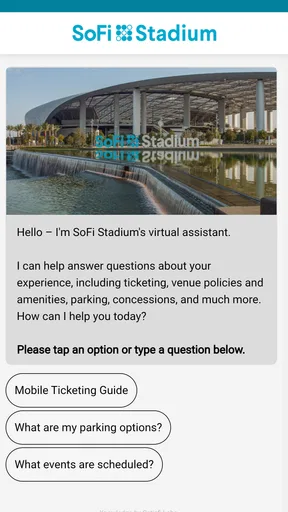
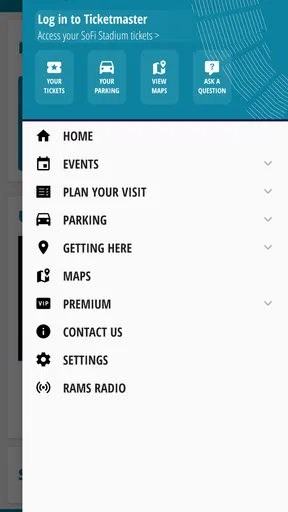
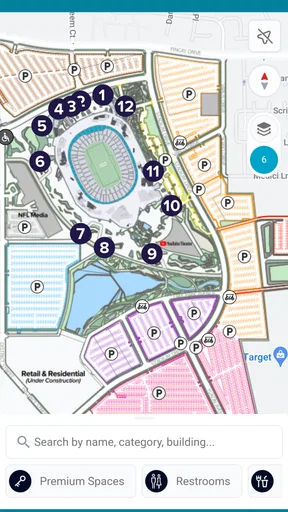
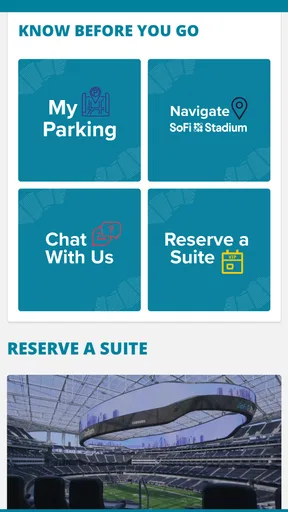

 Analysis by AppCompare
When I plan a day at SoFi Stadium, the hard part is rarely choosing what to see; it is keeping the details straight while coordinating tickets, arrival, food, and the trip home. The stadium’s event app brings many of those tasks into one place, which can make the day feel less scattered. I see its strongest value as a practical companion for people who already have a reason to visit, rather than as an essential download for everyone who enjoys live entertainment.
Designed for event-day reading and navigation
My first impression of the SoFi Stadium app was that its main purpose is easy to understand: help visitors follow events and prepare for a visit. The layout felt approachable in my use, and the event calendar gives a useful starting point when I want to check what is coming up without searching across several sources. That straightforward orientation matters when a person is trying to make a quick decision on a phone, perhaps while comparing plans with friends.
For an event-focused app, clear organization is more useful than a long list of features. I would use the calendar to shortlist a date, then move on to the details that affect the actual outing. Keeping those steps together reduces the mental juggling that often comes with stadium plans. The app is free, and SoFi Stadium and Hollywood Park is the developer. It has an average rating of 4.1 from around 32 ratings, with more than 10,000 installs, so it has a modest but established audience rather than the broad reach of a general ticketing platform.
Making the interface work for different needs
Simple navigation can help visitors who are unfamiliar with stadium apps, but ease of use is not the same thing as accessibility for every person. I would still recommend checking text size, contrast, screen-reader behavior, and touch targets on your own device before relying on the app in a busy setting. Those details can vary with the phone and its system settings, and I would not assume a particular accessibility tool works a certain way without testing it.
There is a useful distinction between planning at home and navigating in a crowd. At home, you can take time to read event information and compare options. On the way to a gate or while coordinating with a group, attention is divided and the screen may be harder to use. I suggest reviewing key details before leaving, saving the information you need in a way that remains easy to reach, and avoiding complicated browsing while walking. That is a sensible habit for any stadium visit, not a substitute for features a visitor may specifically need.
Motor, sensory, and situational considerations
For someone with limited dexterity, using a phone one-handed while carrying belongings or moving through a queue can be frustrating even when menus are clear. I would finish ticket and event tasks before arriving, rather than wait until I am at a crowded entrance. If another person is helping with the plan, agreeing in advance who will handle the phone can prevent last-minute passing back and forth.
Notifications and live event information may help visitors keep up with changes, but frequent alerts can also become distracting, especially in a loud or sensory-heavy environment. I would choose notification settings deliberately and check the app at useful moments instead of treating every alert as something that needs an immediate response. For visitors who prefer less screen time, a companion can help monitor updates while they focus on the event itself.
Worth Reading Before You Choose

EA SPORTS FC Mobile 26 Is a Bigger Football Game, but It Takes Time

Flipboard Shows What News Apps Must Do Beyond the Feed

Switching to Android Auto Means Rethinking Your Driving Routine

Google Calendar Makes a Crowded Week Easier to Manage

Ludo King Makes the Most of the Minutes Between Plans

Baby Panda World Brings Quick Play to Modern Phones, but Its Game Library Feels Busy
Where the app fits—and where it does not
The app is most useful when the venue is central to the plan: checking events, organizing a visit, and bringing related tasks together. A general maps app may still be better for comparing routes across a wider area, while a ticket provider’s app may be the natural place to manage a purchase made there. I would not replace tools I already trust just for the sake of having everything in one app; instead, I would use the stadium app for venue-specific planning and keep a backup route or ticket reference available.
There are trade-offs. A dedicated stadium app can reduce the need to search for venue information, but it also means the usefulness of the download depends on how often you attend events there. If you are visiting once, already have a reliable ticket and travel plan, or prefer not to use another app, checking only the details you need may be enough. People who require particular accessibility support should verify their practical needs before event day and arrange assistance through the appropriate venue channels rather than assume an app can cover every situation.
SoFi Stadium’s app is a free events companion for everyone, and its current version is 25.12.3674. It was released on September 7, 2023, and requires Android 10 or later. Those basics make it straightforward to consider, but the deciding question is more personal: will having stadium-related information on your phone make your own visit easier? If yes, it is worth trying before the day itself, when you have time to explore rather than needing an answer in a hurry.
For everyday use, I would open it while planning with friends: check the event calendar, settle on a date, and then make a shared arrival plan using the directions and parking information. Before leaving, I would review the details that matter most, keep my ticket accessible through the place where I manage it, and agree on a meeting point in case the group gets separated. That small bit of preparation is more valuable than trying to solve every problem from a phone in a crowd.
Its content rating is Everyone, which makes the app suitable for a broad audience in that sense, though families should still make their own plans for travel, meeting up, and keeping children together at a large event. People attending with a companion may find it helpful to divide tasks: one person checks event information while the other handles directions or group coordination. That approach also helps when reading or interacting with a screen is tiring or difficult.
For sensory-sensitive visitors, the most practical benefit is the ability to handle some planning before entering a busy venue. I would use a quieter moment to review the schedule and make decisions, then keep phone checks brief once the event environment becomes stimulating. Conversely, anyone who finds notifications stressful can limit their attention to essential updates and ask a companion to keep an eye on changes. These are workarounds, not guarantees that the app itself will suit every sensory preference.
I would also treat venue directions as one piece of the arrival plan, not the whole plan. A stadium trip can involve a route to the area, parking or drop-off choices, and the final approach on foot. Checking the information in advance gives you a chance to notice what still needs a separate decision, such as how your group will reunite after the event. For broader traffic comparisons or alternate travel options, a general navigation service may offer a better overview; the stadium app is more compelling for the venue-specific part.
A measured recommendation for stadium visitors
SoFi Stadium is an app from the Events category, and I would recommend it most readily to people who attend or are actively planning an event at this venue. Its focused purpose is an advantage when you want stadium information in one place, but it is not automatically a better choice than a ticketing app, a map, or a simple shared note. The best setup may be a mix: use this app for venue planning, keep the purchase channel you already rely on for tickets, and use familiar accessibility settings or assistance that meet your needs.
My inclusive verdict is positive but measured. The app can make preparation more organized, especially for people who prefer to review details before a busy outing, yet each visitor’s comfort depends on their device, preferences, and the support they need. Try the tasks you expect to use before event day, check that the information is easy for you to read and operate, and have a backup plan for the essentials. If those steps fit your routine, this is a sensible companion; if you rarely visit the stadium or need specific support that you have not confirmed, another tool or a direct venue contact may serve you better.
Your All-Access Pass to Entertainment
If you’re like me and love attending live events, the SoFi Stadium app is a game-changer. From the moment I opened it, I was greeted with a sleek design and an intuitive interface. You don’t need to be a tech guru to navigate through it, which is always a plus in my book.
Features That Make Life Easier
Alright, let’s break down what this app has to offer. First up, the event calendar. It’s super detailed, listing upcoming games, concerts, and even those niche events you might not have heard of. I found it really handy to have everything in one place, so I don’t have to keep checking different sites.
Then, there’s the ticketing feature. Buying and managing tickets directly through the app is a breeze. I tested it out with a pretend purchase, and the process was smooth as butter. Plus, you can store your tickets in the app, so no more panicking about losing that crucial piece of paper.
Oh, and for you foodies out there, the app lets you explore dining options within the stadium. You can even order food from your seat and skip the line. I mean, who doesn’t love skipping lines, right?
Staying Connected and Informed
Now, let’s talk about how this app keeps you in the loop. The live updates feature is nothing short of fantastic. You get real-time notifications about any changes to events, parking updates, and even weather alerts. I found this particularly useful when planning my day out, and it definitely saved me from a few potential headaches.
For those who like to stay ahead of the game, there’s also an option to receive exclusive offers and promotions. I snagged a discount on my next ticket purchase, which was a sweet deal.
Getting There and Back
We all know the hassle of getting to a stadium, right? The app’s got you covered. It provides detailed directions and parking information. I tried it out and found it incredibly helpful, especially with the live traffic updates. It’s like having your own personal navigation assistant.
And when the event is over and it’s time to head home, the app helps you find the quickest exit routes. Honestly, anything that makes leaving a crowded place easier is a win in my book.
Final Thoughts
After spending some quality time with the SoFi Stadium app, I can confidently say it’s a must-have for anyone who frequents live events. It’s user-friendly, packed with features, and it genuinely enhances the whole experience from start to finish.
Whether you’re a sports fanatic, a concert lover, or just someone who enjoys a good day out, this app is your ticket to a seamless experience. So, give it a download and let me know how it transforms your event-going adventures. Happy exploring!
Pros
- Intuitive user interface
- easy to navigate.
- Real-time updates on events and schedules.
- Seamless ticket purchasing and management.
- Exclusive content and behind-the-scenes access.
- Customizable notifications for events.
Cons
- Limited functionality without internet connection.
- Occasional glitches during high traffic.
- Requires registration to access all features.
- In-app ads can be intrusive at times.
- Some features hidden behind paywalls.
FAQs for SoFi Stadium
What features does the SoFi Stadium app offer?
The SoFi Stadium app provides a comprehensive experience for visitors. It offers real-time updates about events, parking information, interactive maps, and exclusive content related to ongoing games or concerts. Users can also find dining options and purchase tickets directly through the app, making it a one-stop solution for all stadium-related needs.
Is the SoFi Stadium app free to download and use?
Yes, the SoFi Stadium app is free to download and use. While the app itself does not require any purchase, certain features like buying tickets or parking passes will involve transactions. Users can enjoy most informational features without any additional costs.
How user-friendly is the SoFi Stadium app for first-time visitors?
The SoFi Stadium app is designed with user-friendliness in mind, featuring an intuitive interface that guides first-time visitors effortlessly. The interactive maps are easy to navigate, and the FAQ section within the app addresses common concerns. Additionally, the app offers support to assist users with any issues they might encounter.
Can I use the SoFi Stadium app to enhance my event experience?
Absolutely. The SoFi Stadium app enhances the event experience by providing live updates, exclusive content, and easy access to amenities. Users can watch replays, view player stats, and receive notifications about event schedules. This creates a more immersive and engaging experience for attendees.
What are the requirements for downloading the SoFi Stadium app?
To download the SoFi Stadium app, users need a compatible smartphone with either Android or iOS. Ensure your operating system is up to date for optimal performance. The app requires an internet connection to access its full range of features, including live updates and interactive maps.


